Showing posts with label sql server. Show all posts

Monday, November 21, 2016

Storing passwords in a secure way in a SQL Server database

Problem
Everybody would agree that passwords should be secure, so users should consider these points when they choose passwords. Such as using a mix of characters and special symbols, not using simple words, using a combination of special symbols, letters and numbers, etc. But all these considerations are not enough if passwords are stored in an unsecure way.
In database applications passwords are usually stored in the database, so storing passwords in the database should be implemented very carefully. It is obvious that storing passwords in the table with plain text is very vulnerable, because if an attacker accesses the database he/she can steal users' passwords. It is indisputable that passwords in a database should be encrypted and made undecipherable as much as possible.
Solution
Let's see how to encrypt and store passwords in a SQL Server database. For encrypting passwords we'll use one-way hashing algorithms. These algorithms map the input value to encrypted output and for the same input it generates the same output text. Also there is no decryption algorithm. It means that it's impossible to revert to the original value using encrypted output.
The HASHBYTES function in SQL Server returns a hash for the input value generated with a given algorithm. Possible algorithms for this function are MD2, MD4, MD5, SHA, SHA1 and starting with SQL Server 2012 also include SHA2_256 and SHA2_512. We will choose the strongest - SHA2_512 - for our example (it generates a 130 symbol hash and uses 64 bytes). We should also consider the fact that the stronger algorithm, the more time that is needed for hashing than for weaker algorithms.
Let's assume that we need to create table which stores user's data such as:
CREATE TABLE dbo.[User]
(
    UserID INT IDENTITY(1,1) NOT NULL,
    LoginName NVARCHAR(40) NOT NULL,
    PasswordHash BINARY(64) NOT NULL,
    FirstName NVARCHAR(40) NULL,
    LastName NVARCHAR(40) NULL,
    CONSTRAINT [PK_User_UserID] PRIMARY KEY CLUSTERED (UserID ASC)
)
 
Also we will create a stored procedure to insert user's data (we developed this stored procedure in the simplest way to illustrate this example, but in reality these kind of procedures contain more complicated code):
CREATE PROCEDURE dbo.uspAddUser
    @pLogin NVARCHAR(50), 
    @pPassword NVARCHAR(50), 
    @pFirstName NVARCHAR(40) = NULL, 
    @pLastName NVARCHAR(40) = NULL,
    @responseMessage NVARCHAR(250) OUTPUT
AS
BEGIN
    SET NOCOUNT ON

    BEGIN TRY

        INSERT INTO dbo.[User] (LoginName, PasswordHash, FirstName, LastName)
        VALUES(@pLogin, HASHBYTES('SHA2_512', @pPassword), @pFirstName, @pLastName)

        SET @responseMessage='Success'

    END TRY
    BEGIN CATCH
        SET @responseMessage=ERROR_MESSAGE() 
    END CATCH

END
 
As we can see, the stored procedure takes the password as an input parameter and inserts it into the database in an encrypted form - HASHBYTES('SHA2_512', @pPassword). We can run the stored procedure as follows:
DECLARE @responseMessage NVARCHAR(250)

EXEC dbo.uspAddUser
          @pLogin = N'Admin',
          @pPassword = N'123',
          @pFirstName = N'Admin',
          @pLastName = N'Administrator',
          @responseMessage=@responseMessage OUTPUT

SELECT *
FROM [dbo].[User]

 

encrypted password
As we can see the password's text is unreadable. However encrypting passwords is not a 100% guarantee that passwords can't be cracked. They can be vulnerable to some attacks (dictionary, rainbow tables, etc.). One of the simple examples of this sort of cracking is that attackers can generate hashes for the group of simple, common passwords and store this "password-hash" mapping in the table. Thus using this table they can try to crack users' passwords by comparing hashes from that mapping table with the password hashes of users in case users' data becomes available for the attacker. The weaker the password is (simple, small, etc.), the easier it can be cracked. So, using strong passwords and using the strongest encryption algorithm will minimize the risks.
There is also a way to make a stronger hash, even if the user chooses a weak password. It is a hash generated from the combination of a password and randomly generated text. This randomly generated text is called a salt in cryptography. In this case the attacker should spend incomparably more time, because he/she should also consider the salt for cracking. Salt should be unique for each user, otherwise if two different users have the same password, their password hashes also will be the same and if their salts are the same, it means that the hashed password string for these users will be the same, which is risky because after cracking one of the passwords the attacker will know the other password too.  By using different salts for each user, we can avoid these kinds of situations.
Let's alter our table and the stored procedure to use a salt in the password encryption. We use UNIQUEIDENTIFIER for a salt, because it's randomly generated and a unique string.
ALTER TABLE dbo.[User] ADD Salt UNIQUEIDENTIFIER 
GO

ALTER PROCEDURE dbo.uspAddUser
    @pLogin NVARCHAR(50), 
    @pPassword NVARCHAR(50),
    @pFirstName NVARCHAR(40) = NULL, 
    @pLastName NVARCHAR(40) = NULL,
    @responseMessage NVARCHAR(250) OUTPUT
AS
BEGIN
    SET NOCOUNT ON

    DECLARE @salt UNIQUEIDENTIFIER=NEWID()
    BEGIN TRY

        INSERT INTO dbo.[User] (LoginName, PasswordHash, Salt, FirstName, LastName)
        VALUES(@pLogin, HASHBYTES('SHA2_512', @pPassword+CAST(@salt AS NVARCHAR(36))), @salt, @pFirstName, @pLastName)

       SET @responseMessage='Success'

    END TRY
    BEGIN CATCH
        SET @responseMessage=ERROR_MESSAGE() 
    END CATCH

END
 
Then we truncate the table and run the procedure again:
TRUNCATE TABLE [dbo].[User]

DECLARE @responseMessage NVARCHAR(250)

EXEC dbo.uspAddUser
          @pLogin = N'Admin',
          @pPassword = N'123',
          @pFirstName = N'Admin',
          @pLastName = N'Administrator',
          @responseMessage=@responseMessage OUTPUT

SELECT UserID, LoginName, PasswordHash, Salt, FirstName, LastName
FROM [dbo].[User]
 
And the result will be as follows:


encrypted password with salt

Please note, that salt is stored in the table with plain-text, there is no reason to encrypt it. Now let's create a simple procedure to authenticate the user using an encrypted password with the salt:
CREATE PROCEDURE dbo.uspLogin
    @pLoginName NVARCHAR(254),
    @pPassword NVARCHAR(50),
    @responseMessage NVARCHAR(250)='' OUTPUT
AS
BEGIN

    SET NOCOUNT ON

    DECLARE @userID INT

    IF EXISTS (SELECT TOP 1 UserID FROM [dbo].[User] WHERE LoginName=@pLoginName)
    BEGIN
        SET @userID=(SELECT UserID FROM [dbo].[User] WHERE LoginName=@pLoginName AND PasswordHash=HASHBYTES('SHA2_512', @pPassword+CAST(Salt AS NVARCHAR(36))))

       IF(@userID IS NULL)
           SET @responseMessage='Incorrect password'
       ELSE 
           SET @responseMessage='User successfully logged in'
    END
    ELSE
       SET @responseMessage='Invalid login'

END
 
And we can test it as follows:
DECLARE @responseMessage nvarchar(250)

--Correct login and password
EXEC dbo.uspLogin
  @pLoginName = N'Admin',
  @pPassword = N'123',
  @responseMessage = @responseMessage OUTPUT

SELECT @responseMessage as N'@responseMessage'

--Incorrect login
EXEC dbo.uspLogin
  @pLoginName = N'Admin1', 
  @pPassword = N'123',
  @responseMessage = @responseMessage OUTPUT

SELECT @responseMessage as N'@responseMessage'

--Incorrect password
EXEC dbo.uspLogin
  @pLoginName = N'Admin', 
  @pPassword = N'1234',
  @responseMessage = @responseMessage OUTPUT

SELECT @responseMessage as N'@responseMessage'
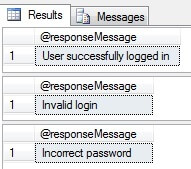
 

test encrypted password storage
Conclusion
Storing passwords in an encrypted way in the database and using unique salts for passwords, decreases the risks that passwords can be cracked. The SQL Server UNIQUEIDENTIFIER data type is a good candidate for a salt taking into consideration its uniqueness and randomness.

Thursday, December 18, 2014

Tuesday, April 19, 2011

What is trigger and different types of Triggers?


Trigger is a SQL server code, which execute when a kind of action on a table occurs like insert, update and delete. It is a database object which is bound to a table and execute automatically.

Triggers are basically of two type’s namely "After Triggers" and "Instead of Triggers".


1.After Triggers:- this trigger occurs after when an insert, update and delete operation has been performed on a table.

“After Triggers” are further divided into three types

AFTER INSERT Trigger.
AFTER UPDATE Trigger.
AFTER DELETE Trigger.

Let us consider that we have the following two tables.

Create “Customer” table with the following field as you see in the below table.


Create “Customer_Audit” table with the following field as you see in the below table.


Cust_ID Cust_Name Operation_Performed Date_Time

The main purpose of creating “Customer_Audit” table is to record the data which occurs on the “Customer” table with their respective operation and date-time.

Let’s begin with “After Insert Trigger”:- This trigger fire after an insert operation performed on a table.

Let us see the example of “After Insert Trigger” for better understanding.


Query:-

Create Trigger TrigInsert on Customer
For insert as

declare @Cust_ID int;
declare @Cust_Name varchar(100);
declare @Operation_Performed varchar(100);
select @Cust_ID=i.Cust_ID from inserted i;
select @Cust_Name=i.Cust_Name from inserted i;
set @Operation_Performed='Inserted Record -- After Insert Trigger';
insert into Customer_Audit
(Cust_ID,Cust_Name,Operation_Performed,Date_Time)
values(@Cust_ID,@Cust_Name,@Operation_Performed,getdate());
PRINT 'AFTER INSERT trigger fired.'

Now, insert a record into Customer table:

Query:- insert into Customer values ('A-10','Danish')

Once the insert statement is successfully done, the record is inserted into the “Customer” table and the “After Trigger” (TrigInsert) is fired and the same record is also stored into “Cutomer_Audit” table.

To see the record in “Customer_Audit” table write query as below:-

Query:- select * from Customer_Audit


You can see that the same record is seen in the “Customer_Audit” table with Operation_performed and the date_time when it was updated.

Now let’s see for “After Update Trigger”:-This trigger fire after an update operation performed on a table.


Let us see the example of “After Update Trigger” for better understanding.

Query:- Create trigger TrigUpdate on Customer


For Update as

declare @Cust_ID int;
declare @Cust_Name varchar(100);
declare @Operation_Performed varchar(100);
select @Cust_ID=i.Cust_ID from inserted i;
select @Cust_Name=i.Cust_Name from inserted i;
set @Operation_performed='Inserted Record -- After Insert';
if update(Cust_Name)
set @Operation_Performed='Updated Record -- After Update Trigger.';
insert into Customer_Audit
(Cust_ID,Cust_Name,Operation_Performed,Date_Time)
values(@Cust_ID,@Cust_Name,@Operation_Performed,getdate())

PRINT 'AFTER UPDATE Trigger fired.'

Now, update a record into “Customer” table:-

Query:- update Customer set Cust_Name = 'Khan Wasim' where Cust_Code like 'A-16'

The record is updated into the Customer table and the TrigUpdate is fired and it stores a record into “Cutomer_audit” table.

To see the record Customer_Audit table write query for that.

Query:- select * from Customer_Audit


Now for, “After Delete Trigger”:-This trigger fire after a delete operation performed on a table.

In a similar way, you can code “After Delete trigger on the table.

2.Instead of Triggers:- this trigger fire before the DML operations occur, first inserted and deleted get flourished and then trigger fires

“Instead of Triggers” are further divided into three types

Instead of INSERT Trigger.
Instead of UPDATE Trigger.
Instead of DELETE Trigger.

Let us see the example of “Instead of UPDATE Trigger” for better understanding.

Query:-

CREATE TRIGGER trgInsteadOfUpdate ON Customer

INSTEAD OF update as

declare @cust_id int;
declare @cust_name varchar(100);
declare @cust_salary int;
select @cust_id=d. Cust_ID from deleted d;
select @cust_name=d. Cust_Name from deleted d;
select @cust_salary =d.Cust_Salary from deleted d;

BEGIN

if(@cust_salary >4500)
begin
RAISERROR('Cannot delete where salary > 4500',16,1);
ROLLBACK;
end
else
begin
delete from Customer where Cust_ID =@cust_id;
COMMIT;
insert into
Customer_Audit(Cust_ID,Cust_Name,Cust_Salary,Operation_Performed,Date_Time)
values(@cust_id,@cust_name,@cust_salary,'Updated -- Instead Of Updated Trigger.',getdate());
PRINT 'Record Updated -- Instead Of Updated Trigger.'
end
END
Now, update a record into “Customer” table:-

Query:- update Customer set Cust_Name = 'Khan Wasim' where Cust_Code like 'A-09'

When you try to update Customer table it will raise an error as we have use Instead of Update trigger.

Error:- Server: Msg 50000, Level 16, State 1, Procedure trgInsteadOfUpdate, Line 15


Cannot update where salary > 4500

In a similar way, you can code “Instead Delete trigger” and “Instead Insert trigger” on the table.


Wednesday, July 28, 2010

SQL SERVER – Delete Duplicate Records

Following code is useful to delete duplicate records. The table must have identity column, which will be used to identify the duplicate records. Table in example is has ID as Identity Column and Columns which have duplicate data are DuplicateColumn1, DuplicateColumn2 and DuplicateColumn3.

DELETE
FROM MyTable
WHERE ID NOT IN
(
SELECT MAX(ID)
FROM MyTable
GROUP BY DuplicateColumn1, DuplicateColumn2, DuplicateColumn3)

Tuesday, June 29, 2010

Tables in SQL Server

When writing T-SQL code, you often need a table in which to store data temporarily when it comes time to execute that code. You have four table options: normal tables, local temporary tables, global temporary tables and table variables. I’ll discuss the differences between using temporary tables in SQL Server versus table variables. Each of the four table options has its own purpose and use, and each has its benefits and issues:

* Normal tables are exactly that, physical tables defined in your database.
* Local temporary tables are temporary tables that are available only to the session that created them. These tables are automatically destroyed at the termination of the procedure or session that created them.
* Global temporary tables are temporary tables that are available to all sessions and all users. They are dropped automatically when the last session using the temporary table has completed. Both local temporary tables and global temporary tables are physical tables created within the tempdb database.
* Table variables are stored within memory but are laid out like a table. Table variables are partially stored on disk and partially stored in memory. It’s a common misconception that table variables are stored only in memory. Because they are partially stored in memory, the access time for a table variable can be faster than the time it takes to access a temporary table.

Creating indexes on SQL Server tables

Because both local and global temporary tables are physical tables within the tempdb database, indexes can be created on these tables to increase performance as needed. As with any index creation, this process can take time on larger tables. Because temp tables are physical tables, you can also create a primary key on them via the CREATE TABLE command or via the ALTER TABLE command. You can use the ALTER TABLE command to add any defaults, new columns, or constraints that you need to within your code.

Unlike local and global temporary tables, table variables cannot have indexes created on them. The exception is that table variables can a primary key defined upon creation using the DECLARE @variable TABLE command. This will then create a clustered or non-clustered index on the table variable. The CREATE INDEX command does not recognize table variables. Therefore, the only index available to you is the index that accompanies the primary key and is created upon table variable declaration.

How do the internal workings of SQL Server perform differently between table variables and temporary tables?

The differences between accessing tables and variables cause the internal processes within SQL Server to treat the objects quite differently. Temporary tables are actually physical tables, so the SQL Optimizer and locking engine handle the tables just as they would any other database tables. Because reads to a temporary table are made (including local temporary tables), a read lock is placed on the table.

This locking process takes time and CPU resources. When reading from a table variable – because the table variable is stored partially within memory and cannot be accessed by any other user or process on the system – SQL Server knows locking is not required. In a very busy database, this lack of locking can improve system performance because locks do not have to be taken, escalated and checked for each data access operation.

Limits of temporary tables and table variables

Temporary tables and table variables both have their strengths, but they both have weaknesses too. On a heavy load system that has lots of usage of temporary tables, the disk array servicing the tempdb database will experience a higher than expected load. This happens because all reads and writes to the temporary tables are done within the tempdb database. Table variables will perform poorly with large record sets, especially when doing joins because there can be no indexes other than a primary key. Beware, though, when many users start using table variables — large amounts of RAM are used because all temporary tables are stored and processed directly in memory. Table variables should hold no more than 2 Megs to 3 Megs of data each (depending on user load and system memory).

Both temporary tables and table variables can be extremely useful tools in developers’ and administrators’ arsenals; however, care must be taken as to when to use each solution. There is no end-all solution, and you must choose the correct solution for the correct situation.

Local Temporary tables:

They are created using same syntax as CREATE TABLE except table name is preceded by ‘#’ sign. When table is preceded by single ‘#’ sign, it is defined as local temporary table and its scope is limited to session in which it is created.

Open one session in Query Analyzer or SSMS (Management Studio) and create a temporary table as shown below.

CREATE TABLE #TEMP
(
COL1 INT,
COL2 VARCHAR(30),
COL3 DATETIME DEFAULT GETDATE()
)

GO

Upon successful execution of above command, MS SQL Server creates table in tempdb database. One cannot create another temporary table with the same name in the same session. It will give an error but table with the same name can be created from another session. To do this, open another session from SSMS or query analyzer and issue same command again. It will successfully create new temporary table for that session.

In order to identify which table is created by which user (in case of same temporary table name), SQL Server suffixes it with the number. This is very common scenario when temporary table is defined in the stored procedure and procedure is getting executed by different users simultaneously. Since we have created temporary table with the same name from two different sessions, we should see two entries in tempdb database. From another session or any of the current session, issue following command. Output is displayed after select statement.

USE TEMPDB
GO
SELECT Table_Catalog, Table_Name FROM information_schema.tables
WHERE table_name like ‘%TEMP%’
GO

Table_Catalog Table_Name
————- ———-
tempdb #TEMP________0000000001F7
tempdb #TEMP________0000000001F9

Now create some data from the session in which temporary table (#temp) is created.

INSERT INTO #TEMP(COL1, COL2) VALUES(1,’Decipher’);
INSERT INTO #TEMP(COL1, COL2) VALUES(2,’Information’);
INSERT INTO #TEMP(COL1, COL2) VALUES(3,’systems’);

Selecting data from temporary table will give following results.

COL1 COL2 COL3
———– —————————— ———————–
1 Decipher 2007-03-27 19:39:56.727
2 Information 2007-03-27 19:39:56.727
3 systems 2007-03-27 19:39:56.727

This data is not visible from another session since we are using local temporary table. We can verify it by connecting to another session and querying the #temp table. Local temporary tables are dropped when session which created the table is ended, if one has not dropped it explicitly.

Also, please do note that if you are creating temp tables in a stored procedure, the scope for the existence of those temporary tables is only the procedure execution. The temp tables automatically get dropped once the procedure execution is over (they can be explicitly dropped as well). Once the procedure execution is over, those temp tables will not be accessible from within that session. Example:

create proc test
as
begin
set nocount on
create table #temp (col1 int)
insert into #temp values (1)
end
go

exec test
select * from #temp

Msg 208, Level 16, State 0, Line 2
Invalid object name ‘#temp’.

Global Temporary tables:

Syntax difference between global and local temporary table is of an extra ‘#’ sign. Global temporary tables are preceded with two ‘#’ (##) sign. Following is the definition. In contrast of local temporary tables, global temporary tables are visible across entire instance.

CREATE TABLE ##TEMP_GLOBAL
(
COL1 INT,
COL2 VARCHAR(30),
COL3 DATETIME DEFAULT GETDATE()
)
GO

Execute above statement to create global temporary table. You can verify it by checking the tempdb database. As global temporary tables are available across the instance, SQL Server doesn’t suffix it with the number. Following is the output of query ran against tempdb.

USE TEMPDB
GO
SELECT Table_Catalog, Table_Name FROM information_schema.tables
WHERE table_name like ‘##TEMP%’
GO

Table_Catalog Table_Name
————- ———-
tempdb ##TEMP_GLOBAL

There will be only single instance of global temporary table. Attempt of creating global temporary table with the same name from any other session will result into an error.

Create some data in one of the session where temporary table (##temp_global) is created.

INSERT INTO ##TEMP_GLOBAL(COL1, COL2) VALUES(1,’Decipher’);
INSERT INTO ##TEMP_GLOBAL(COL1, COL2) VALUES(2,’Information’);
INSERT INTO ##TEMP_GLOBAL(COL1, COL2) VALUES(3,’systems’);

Connect to other existing session or open new session. Execute following statement and you will notice that global temporary table is available along with the data from other session as well.

COL1 COL2 COL3
———– —————————— ———————–
1 Decipher 2007-03-28 09:52:34.310
2 Information 2007-03-28 09:52:34.310
3 systems 2007-03-28 09:52:34.310

Global temporary tables are dropped when last session accessing the tables is closed. It is always good practice to drop the temporary tables in the same scope, once we are done with it. This will help us in avoiding creation error when same connection from the connection pool is used by different processes which access temporary tables.

Global temporary tables can be used in data warehousing application where one session performs the ETL and populate the global temporary tables and other sessions read from the table, specific data and process it.

Features of Temp Tables

We’ll list out features that differentiate a Temp Table between either a Permanent Table or a Table variable. These pointers will be helpful to keep in mind when you consider Table Variables in our next post.

Scope: Within a connection, a temporary table object is visible to the creating level and inner levels (nested). For example, if you create a stored procedure and declare a temporary table object within it, you can call another stored procedure from that stored procedure (a nested stored procedure) and perform operations like inserting, updating and deleting that temporary table object. Once the main creating level terminates, the temp table is automatically destroyed. But don’t be too complacent – you’ll have to wait for the system to perform a clean up and therefore, it is highly recommended that you manually drop your temporary table.

Locking: The prospect of table locking is reduced when it comes to local temporary tables since this table is being used by only one user. One aspect where you might want to keep this in mind is that if you cancel a transaction which contains the creation of a temp table object and then cancel that query, an exclusive and update lock can appear on the tempdb. This lock will persist till the complete transaction has closed with a COMMIT or a ROLLBACK

Logging: There is less logging involved with temporary tables compared to permanent tables.

Transaction: When using a temporary table, a temporary table is an integral part of an outer transaction and therefore, ROLLBACKs must be supported by Logging

Indexing: We can create indexes on temporary tables explicitly on them. Hence, there is scope for performance enhancement when you talk about temp tables.

Constraints: All constraints are available for exploiting on a temp table EXCEPT when it comes to referring a Foreign Key Constraints

Statistics: SQL Server can create Statistics for temp tables just like we do for permanent tables and therefore, the query optimizer has the option of choosing different plans. Hence, with this in mind, be aware of the scope of Stored Procedure Recompiles.

Recompiles: There is scope for a large number of Stored Procedure Recompiles especially when you have DDL statements mixed anywhere within your Stored Procedure.

Temp Table Size: Can hold any volume of data. This will be a strong part of the deciding factor when you want to choose between a temporary table and a table variable.

Features of Table Variables

Now that you’ve got a hang around working with a Table Variable, let me mention the main pointers that we need to keep in mind while working with. This will set the stage for differentiating between a Temp Table and Table Variable which I’ll illustrate in my next post.

Transactions: Table Variables are not bound to any transaction as they are just like any other variable

Minimum Constraints: A Table Variable permits us to use only the PRIMARY KEY, UNIQUE KEY and NULL constraint only. What this implies behind the scenes is that we can have unique indexes. The only possibility of creating a non-unique index is if we add attributes and make that blend unique and have a PRIMARY KEY or a UNIQUE KEY on the combination we just made.

No SELECT INTO: We cannot use a SELECT INTO with Table Variables in SQL Server 2000 though the feature is available with Table Variables in SQL Server 2005. Likewise, we can also have INSERT INTO working with Table Variables against a SELECT but not against an EXEC Stored Procedure.

No ALTER TABLE Variable: We cannot ALTER a Table once it has been declared. This may look a little rigid but remember that recompilations can come out like wild fire when there are DDL (Data Definition Language .i.e Schema) changes and therefore, this helps to avoid recompilations.

Scope: Just like any other variable, a Table Variable’s scope exists only within the context of the current level. Therefore, unlike Temp Tables, it is not accessible to sub levels (of Stored Procedures)

Table Variables And The TempDb: Okay, now I’ll touch upon one of the most common myths that exist among developers: that Table Variables have nothing to do with TempDb and therefore, they have no physical representation in the TempDb and therefore, they reside in ONLY memory and therefore they’re the best option for efficient processing.

Not entirely true. Table Variables do indeed have a physical representation within the TempDb and this can proved with a simple query in your database against the TempDb:

No Statistics: When it comes to Table Variables, the SQL Server optimizer does not create distribution statistics. Therefore, you run the risk of referring not-so-good query plans when the SQL Server optimizer selects after checking up with histograms. And if you consider this aspect with Tables Variables that contain huge amounts of data, we fall into serious I/O thrashing. Hence, as stated in the closing section of the last point, we have to have a thorough understanding of our scenario to choose a temporary object for the context.

A possible replacement for temp tables is a table variable.

In summary, following are the key points when temporary tables are involved.

* Temporary tables can be defined as local or global temporary tables.
* Local temporary tables are available to session in which they are created. If another session creates the table with the same name, it will be different copy of the table in tempdb database.
* Global temporary tables are available across the instance. Any user from any session can access it.
* It is best practice to drop the temporary table when related work is finished rather than relying on connection to end for the cleanup.
* Table variables can be used instead of temporary tables for performance reasons and when dealing with smaller sub-sets.
* When used in the procedure,function or trigger, its scope ends once execution is completed.

Limitations of Temporary Tables

Temporary tables are created in the tempdb database and create additional overhead for SQL Server, reducing overall performances. SQL Server has numerous problems with operations against temporary tables.

Using Temporary Tables Effectively

If you do not have any option other than to use temporary tables, use them affectively. There are few steps to be taken.

* Only include the necessary columns and rows rather than using all the columns and all the data which will not make sense of using temporary tables. Always filter your data into the temporary tables.
* When creating temporary tables, do not use SELECT INTO statements, Instead of SELECT INTO statements, create the table using DDL statement and use INSERT INTO to populate the temporary table.
* Use indexes on temporary tables. Earlier days, I always forget to use a index on temporary. Specially, for large temporary tables consider using clustered and non-clustered indexes on temporary tables.
* After you finish the using your temporary table, delete them. This will free the tempdb resources. Yes, I agree that temporary tables are deleted when connection is ended. but do not wait until such time.
* When creating a temporary table do not create them with a transaction. If you create it with a transaction, it will lock some system tables (syscolumns, sysindexes, syscomments). This will prevent others from executing the same query.

Conclusion

Generally, temporary tables should be avoided as much as possible. If you need to use them follow the steps above so that you have the minimum impact on server performance

If you have to use a temp table, do not create it from within a transaction. If you do, then it will lock some system tables (syscolumns, sysindexes, and syscomments) and prevent others from executing the same query, greatly hurting concurrency and performance. In effect, this turns your application into a single-user application.

To avoid this problem, create the temporary table before the transaction. This way, the system tables are not locked and multiple users will have the ability to run this same query at the same time, helping concurrency and performance.

Thursday, June 17, 2010

Alternatives to @@IDENTITY

@@IDENTITY

on a connection

regardless of the table

regardless of the scope

IDENT_CURRENT('tablename')

Regardless of the connection

produced in a table

regardless of the scope

SELECT SCOPE_IDENTITY()

produced on a connection

regardless of the table

in the same scope


SELECT @@IDENTITY
It returns the last IDENTITY value produced on a connection, regardless of the table that produced the value, and regardless of the scope of the statement that produced the value.
@@IDENTITY will return the last identity value entered into a table in your current session. While @@IDENTITY is limited to the current session, it is not limited to the current scope. If you have a trigger on a table that causes an identity to be created in another table, you will get the identity that was created last, even if it was the trigger that created it.

SELECT SCOPE_IDENTITY()

It returns the last IDENTITY value produced on a connection and by a statement in the same scope, regardless of the table that produced the value.
SCOPE_IDENTITY(), like @@IDENTITY, will return the last identity value created in the current session, but it will also limit it to your current scope as well. In other words, it will return the last identity value that you explicitly created, rather than any identity that was created by a trigger or a user defined function.

SELECT IDENT_CURRENT(‘tablename’)

It returns the last IDENTITY value produced in a table, regardless of the connection that created the value, and regardless of the scope of the statement that produced the value.
IDENT_CURRENT is not limited by scope and session; it is limited to a specified table. IDENT_CURRENT returns the identity value generated for a specific table in any session and any scope.

To avoid the potential problems associated with adding a trigger later on, always use SCOPE_IDENTITY() to return the identity of the recently added row in your T SQL Statement or Stored Procedure.

Wednesday, June 9, 2010

cursors status

1 Find out the cursors that are allocated but not opened or closed
01.--Method 1
02.
03.select name from sys.dm_exec_cursors(0) where is_open =0
04.
05.
06.--Method 2
07.
08.select
09. cur.cursor_name
10.from
11. sys.syscursorrefs as ref inner join sys.syscursors as cur on ref.cursor_handl=cur.cursor_handle
12.where
13. cur.open_status =0

2 Find out the cursors that are opened and not closed

01.--Method 1
02.
03.select name from sys.dm_exec_cursors(0) where is_open =1
04.
05.
06.--Method 2
07.
08.select
09. cur.cursor_name
10.from
11. sys.syscursorrefs as ref inner join sys.syscursors as cur on ref.cursor_handl=cur.cursor_handle
12.where
13. cur.open_status =1

3 Find out the cursors that are allocated but not deallocated

01.--Method 1
02.
03.select name from sys.dm_exec_cursors(0)
04.
05.
06.--Method 2
07.
08.select
09. cur.cursor_name
10.from
11. sys.syscursorrefs as ref inner join sys.syscursors as cur on ref.cursor_handl=cur.cursor_handle

Cursors

How to Perform SQL Server Row-by-Row Operations Without Cursors


USE AdventureWorks
GO
DECLARE @ProductID INT
DECLARE
@getProductID CURSOR
SET
@getProductID = CURSOR FOR
SELECT
ProductID
FROM Production.Product
OPEN @getProductID
FETCH NEXT
FROM @getProductID INTO @ProductID
WHILE @@FETCH_STATUS = 0
BEGIN
PRINT
@ProductID
FETCH NEXT
FROM @getProductID INTO @ProductID
END
CLOSE
@getProductID
DEALLOCATE @getProductID
GO

SQL cursors have been a curse to database programming for many years because of their poor performance. On the other hand, they are extremely useful because of their flexibility in allowing very detailed data manipulations at the row level. Using cursors against SQL Server tables can often be avoided by employing other methods, such as using derived tables, set-based queries, and temp tables. A discussion of all these methods is beyond the scope of this article, and there are already many well-written articles discussing these techniques.

The focus of this article is directed at using non-cursor-based techniques for situations in which row-by-row operations are the only, or the best method available, to solve a problem. Here, I will demonstrate a few programming methods that provide a majority of the cursor’s flexibility, but without the dramatic performance hit.

Let’s begin by reviewing a simple cursor procedure that loops through a table. Then we’ll examine a non-cursor procedure that performs the same task.

if exists (select * from sysobjects where name = N'prcCursorExample')

drop procedure prcCursorExample

go

CREATE PROCEDURE prcCursorExample

AS

/*

** Cursor method to cycle through the Customer table and get Customer Info for each iRowId.

**

** Revision History:

** ---------------------------------------------------

** Date Name Description Project

** ---------------------------------------------------

** 08/12/03 DVDS Create ----

**

*/

SET NOCOUNT ON

-- declare all variables!

DECLARE @iRowId int,

@vchCustomerName nvarchar(255),

@vchCustomerNmbr nvarchar(10)

-- declare the cursor

DECLARE Customer CURSOR FOR

SELECT iRowId,

vchCustomerNmbr,

vchCustomerName

FROM CustomerTable

OPEN Customer

FETCH Customer INTO @iRowId,
@vchCustomerNmbr,
@vchCustomerName

-- start the main processing loop.

WHILE @@Fetch_Status = 0

BEGIN

-- This is where you perform your detailed row-by-row

-- processing.

-- Get the next row.

FETCH Customer INTO @iRowId,
@vchCustomerNmbr,
@vchCustomerName

END

CLOSE Customer

DEALLOCATE Customer

RETURN


As you can see, this is a very straight-forward cursor procedure that loops through a table called CustomerTable and retrieves iRowId, vchCustomerNmbr and vchCustomerName for every row. Now we will examine a non-cursor version that does the exact same thing:

if exists (select * from sysobjects where name = N'prcLoopExample')

drop procedure prcLoopExample

go

CREATE PROCEDURE prcLoopExample

AS

/*

** Non-cursor method to cycle through the Customer table and get Customer Info for each iRowId.

**

** Revision History:

** ------------------------------------------------------

** Date Name Description Project

** ------------------------------------------------------

** 08/12/03 DVDS Create -----

**

*/

SET NOCOUNT ON

-- declare all variables!

DECLARE @iReturnCode int,

@iNextRowId int,

@iCurrentRowId int,

@iLoopControl int,

@vchCustomerName nvarchar(255),

@vchCustomerNmbr nvarchar(10)

@chProductNumber nchar(30)

-- Initialize variables!

SELECT @iLoopControl = 1

SELECT @iNextRowId = MIN(iRowId)

FROM CustomerTable

-- Make sure the table has data.

IF ISNULL(@iNextRowId,0) = 0

BEGIN

SELECT 'No data in found in table!'

RETURN

END

-- Retrieve the first row

SELECT @iCurrentRowId = iRowId,

@vchCustomerNmbr = vchCustomerNmbr,

@vchCustomerName = vchCustomerName

FROM CustomerTable

WHERE iRowId = @iNextRowId

-- start the main processing loop.

WHILE @iLoopControl = 1

BEGIN

-- This is where you perform your detailed row-by-row

-- processing.

-- Reset looping variables.

SELECT @iNextRowId = NULL

-- get the next iRowId

SELECT @iNextRowId = MIN(iRowId)

FROM CustomerTable

WHERE iRowId > @iCurrentRowId

-- did we get a valid next row id?

IF ISNULL(@iNextRowId,0) = 0

BEGIN

BREAK

END

-- get the next row.

SELECT @iCurrentRowId = iRowId,

@vchCustomerNmbr = vchCustomerNmbr,

@vchCustomerName = vchCustomerName

FROM CustomerTable

WHERE iRowId = @iNextRowId

END

RETURN

There are several things to note about the above procedure.

For performance reasons, you will generally want to use a column like "iRowId" as your basis for looping and row retrieval. It should be an auto-incrementing integer data type, along with being the primary key column with a clustered index.

There may be times in which the column containing the primary key and/or clustered index is not the appropriate choice for looping and row retrieval. For example, the primary key and/or clustered index may have already been built on a column using uniqueindentifier as the data type. In such a case, you can usually add an auto-increment integer data column to the table and build a unique index or constraint on it.

The MIN function is used in conjunction with greater than “>” to retrieve the next available iRowId. You could also use the MAX function in conjunction with less than “<” to achieve the same result:

SELECT @iNextRowId = MAX(iRowId)

FROM CustomerTable

WHERE iRowId < @iCurrentRowId

Be sure to reset your looping variable(s) to NULL before retrieving the next @iNextRowId value. This is critical because the SELECT statement used to get the next iRowId will not set the @iNextRowId variable to NULL when it reaches the end of the table. Instead, it will fail to return any new values and @iNextRowId will keep the last valid, non-NULL, value it received, throwing your procedure into an endless loop. This brings us to the next point, exiting the loop.

When @iNextRowId is NULL, meaning the loop has reached the end of the table, you can use the BREAK command to exit the WHILE loop. There are other ways of exiting from a WHILE loop, but the BREAK command is sufficient for this example.

You will notice that in both procedures I have included the comments listed below in order to illustrate the area in which you would perform your detailed, row-level processing.

-- This is where you perform your detailed row-by-row

-- processing.

Quite obviously, your row level processing will vary greatly, depending upon what you need to accomplish. This variance will have the most profound impact on performance.

For example, suppose you have a more complex task which requires a nested loop. This is equivalent to using nested cursors; the inner cursor, being dependent upon values retrieved from the outer one, is declared, opened, closed and deallocated for every row in the outer cursor. (Please reference the DECLARE CURSOR section in SQL Server Books Online for an example of this.) In such a case, you will achieve much better performance by using the non-cursor looping method because SQL is not burdened by the cursor activity.

Page 3 / 3

Here is an example procedure with a nested loop and no cursors:

if exists (select * from sysobjects where name = N'prcNestedLoopExample')

drop procedure prcNestedLoopExample

go

CREATE PROCEDURE prcNestedLoopExample

AS

/*

** Non-cursor method to cycle through the Customer table ** and get Customer Name for each iCustId. Get all
** products for each iCustid.

**

** Revision History:

** -----------------------------------------------------

** Date Name Description Project

** -----------------------------------------------------

** 08/12/03 DVDS Create -----

**

*/

SET NOCOUNT ON

-- declare all variables!

DECLARE @iReturnCode int,

@iNextCustRowId int,

@iCurrentCustRowId int,

@iCustLoopControl int,

@iNextProdRowId int,

@iCurrentProdRowId int,

@vchCustomerName nvarchar(255),

@chProductNumber nchar(30),

@vchProductName nvarchar(255)

-- Initialize variables!

SELECT @iCustLoopControl = 1

SELECT @iNextCustRowId = MIN(iCustId)

FROM Customer

-- Make sure the table has data.

IF ISNULL(@iNextCustRowId,0) = 0

BEGIN

SELECT 'No data in found in table!'

RETURN

END

-- Retrieve the first row

SELECT @iCurrentCustRowId = iCustId,

@vchCustomerName = vchCustomerName

FROM Customer

WHERE iCustId = @iNextCustRowId

-- Start the main processing loop.

WHILE @iCustLoopControl = 1

BEGIN

-- Begin the nested(inner) loop.

-- Get the first product id for current customer.

SELECT @iNextProdRowId = MIN(iProductId)

FROM CustomerProduct

WHERE iCustId = @iCurrentCustRowId

-- Make sure the product table has data for
-- current customer.

IF ISNULL(@iNextProdRowId,0) = 0

BEGIN

SELECT 'No products found for this customer.'

END

ELSE

BEGIN

-- retrieve the first full product row for
-- current customer.

SELECT @iCurrentProdRowId = iProductId,

@chProductNumber = chProductNumber,

@vchProductName = vchProductName

FROM CustomerProduct

WHERE iProductId = @iNextProdRowId

END

WHILE ISNULL(@iNextProdRowId,0) <> 0

BEGIN

-- Do the inner loop row-level processing here.

-- Reset the product next row id.

SELECT @iNextProdRowId = NULL

-- Get the next Product id for the current customer

SELECT @iNextProdRowId = MIN(iProductId)

FROM CustomerProduct

WHERE iCustId = @iCurrentCustRowId

AND iProductId > @iCurrentProdRowId

-- Get the next full product row for current customer.

SELECT @iCurrentProdRowId = iProductId,

@chProductNumber = chProductNumber,

@vchProductName = vchProductName

FROM CustomerProduct

WHERE iProductId = @iNextProdRowId

END

-- Reset inner loop variables.

SELECT @chProductNumber = NULL

SELECT @vchProductName = NULL

SELECT @iCurrentProdRowId = NULL

-- Reset outer looping variables.

SELECT @iNextCustRowId = NULL

-- Get the next iRowId.

SELECT @iNextCustRowId = MIN(iCustId)

FROM Customer

WHERE iCustId > @iCurrentCustRowId

-- Did we get a valid next row id?

IF ISNULL(@iNextCustRowId,0) = 0

BEGIN

BREAK

END

-- Get the next row.

SELECT @iCurrentCustRowId = iCustId,

@vchCustomerName = vchCustomerName

FROM Customer

WHERE iCustId = @iNextCustRowId

END

RETURN

In the above example we are looping through a customer table and, for each customer id, we are then looping through a customer product table, retrieving all existing product records for that customer. Notice that a different technique is used to exit from the inner loop. Instead of using a BREAK statement, the WHILE loop depends directly on the value of @iNextProdRowId. When it becomes NULL, having no value, the WHILE loop ends.

Conclusion

SQL Cursors are very useful and powerful because they offer a high degree of row-level data manipulation, but this power comes at a price: negative performance. In this article I have demonstrated an alternative that offers much of the cursor’s flexibility, but without the negative impact to performance. I have used this alternative looping method several times in my professional career to the benefit of cutting many hours of processing time on production SQL Servers.

Popular Posts

Recent Posts

Unordered List

Text Widget