Monday, November 21, 2016

Storing passwords in a secure way in a SQL Server database

Problem
Everybody would agree that passwords should be secure, so users should consider these points when they choose passwords. Such as using a mix of characters and special symbols, not using simple words, using a combination of special symbols, letters and numbers, etc. But all these considerations are not enough if passwords are stored in an unsecure way.
In database applications passwords are usually stored in the database, so storing passwords in the database should be implemented very carefully. It is obvious that storing passwords in the table with plain text is very vulnerable, because if an attacker accesses the database he/she can steal users' passwords. It is indisputable that passwords in a database should be encrypted and made undecipherable as much as possible.
Solution
Let's see how to encrypt and store passwords in a SQL Server database. For encrypting passwords we'll use one-way hashing algorithms. These algorithms map the input value to encrypted output and for the same input it generates the same output text. Also there is no decryption algorithm. It means that it's impossible to revert to the original value using encrypted output.
The HASHBYTES function in SQL Server returns a hash for the input value generated with a given algorithm. Possible algorithms for this function are MD2, MD4, MD5, SHA, SHA1 and starting with SQL Server 2012 also include SHA2_256 and SHA2_512. We will choose the strongest - SHA2_512 - for our example (it generates a 130 symbol hash and uses 64 bytes). We should also consider the fact that the stronger algorithm, the more time that is needed for hashing than for weaker algorithms.
Let's assume that we need to create table which stores user's data such as:
CREATE TABLE dbo.[User]
(
    UserID INT IDENTITY(1,1) NOT NULL,
    LoginName NVARCHAR(40) NOT NULL,
    PasswordHash BINARY(64) NOT NULL,
    FirstName NVARCHAR(40) NULL,
    LastName NVARCHAR(40) NULL,
    CONSTRAINT [PK_User_UserID] PRIMARY KEY CLUSTERED (UserID ASC)
)
 
Also we will create a stored procedure to insert user's data (we developed this stored procedure in the simplest way to illustrate this example, but in reality these kind of procedures contain more complicated code):
CREATE PROCEDURE dbo.uspAddUser
    @pLogin NVARCHAR(50), 
    @pPassword NVARCHAR(50), 
    @pFirstName NVARCHAR(40) = NULL, 
    @pLastName NVARCHAR(40) = NULL,
    @responseMessage NVARCHAR(250) OUTPUT
AS
BEGIN
    SET NOCOUNT ON

    BEGIN TRY

        INSERT INTO dbo.[User] (LoginName, PasswordHash, FirstName, LastName)
        VALUES(@pLogin, HASHBYTES('SHA2_512', @pPassword), @pFirstName, @pLastName)

        SET @responseMessage='Success'

    END TRY
    BEGIN CATCH
        SET @responseMessage=ERROR_MESSAGE() 
    END CATCH

END
 
As we can see, the stored procedure takes the password as an input parameter and inserts it into the database in an encrypted form - HASHBYTES('SHA2_512', @pPassword). We can run the stored procedure as follows:
DECLARE @responseMessage NVARCHAR(250)

EXEC dbo.uspAddUser
          @pLogin = N'Admin',
          @pPassword = N'123',
          @pFirstName = N'Admin',
          @pLastName = N'Administrator',
          @responseMessage=@responseMessage OUTPUT

SELECT *
FROM [dbo].[User]

 

encrypted password
As we can see the password's text is unreadable. However encrypting passwords is not a 100% guarantee that passwords can't be cracked. They can be vulnerable to some attacks (dictionary, rainbow tables, etc.). One of the simple examples of this sort of cracking is that attackers can generate hashes for the group of simple, common passwords and store this "password-hash" mapping in the table. Thus using this table they can try to crack users' passwords by comparing hashes from that mapping table with the password hashes of users in case users' data becomes available for the attacker. The weaker the password is (simple, small, etc.), the easier it can be cracked. So, using strong passwords and using the strongest encryption algorithm will minimize the risks.
There is also a way to make a stronger hash, even if the user chooses a weak password. It is a hash generated from the combination of a password and randomly generated text. This randomly generated text is called a salt in cryptography. In this case the attacker should spend incomparably more time, because he/she should also consider the salt for cracking. Salt should be unique for each user, otherwise if two different users have the same password, their password hashes also will be the same and if their salts are the same, it means that the hashed password string for these users will be the same, which is risky because after cracking one of the passwords the attacker will know the other password too.  By using different salts for each user, we can avoid these kinds of situations.
Let's alter our table and the stored procedure to use a salt in the password encryption. We use UNIQUEIDENTIFIER for a salt, because it's randomly generated and a unique string.
ALTER TABLE dbo.[User] ADD Salt UNIQUEIDENTIFIER 
GO

ALTER PROCEDURE dbo.uspAddUser
    @pLogin NVARCHAR(50), 
    @pPassword NVARCHAR(50),
    @pFirstName NVARCHAR(40) = NULL, 
    @pLastName NVARCHAR(40) = NULL,
    @responseMessage NVARCHAR(250) OUTPUT
AS
BEGIN
    SET NOCOUNT ON

    DECLARE @salt UNIQUEIDENTIFIER=NEWID()
    BEGIN TRY

        INSERT INTO dbo.[User] (LoginName, PasswordHash, Salt, FirstName, LastName)
        VALUES(@pLogin, HASHBYTES('SHA2_512', @pPassword+CAST(@salt AS NVARCHAR(36))), @salt, @pFirstName, @pLastName)

       SET @responseMessage='Success'

    END TRY
    BEGIN CATCH
        SET @responseMessage=ERROR_MESSAGE() 
    END CATCH

END
 
Then we truncate the table and run the procedure again:
TRUNCATE TABLE [dbo].[User]

DECLARE @responseMessage NVARCHAR(250)

EXEC dbo.uspAddUser
          @pLogin = N'Admin',
          @pPassword = N'123',
          @pFirstName = N'Admin',
          @pLastName = N'Administrator',
          @responseMessage=@responseMessage OUTPUT

SELECT UserID, LoginName, PasswordHash, Salt, FirstName, LastName
FROM [dbo].[User]
 
And the result will be as follows:


encrypted password with salt

Please note, that salt is stored in the table with plain-text, there is no reason to encrypt it. Now let's create a simple procedure to authenticate the user using an encrypted password with the salt:
CREATE PROCEDURE dbo.uspLogin
    @pLoginName NVARCHAR(254),
    @pPassword NVARCHAR(50),
    @responseMessage NVARCHAR(250)='' OUTPUT
AS
BEGIN

    SET NOCOUNT ON

    DECLARE @userID INT

    IF EXISTS (SELECT TOP 1 UserID FROM [dbo].[User] WHERE LoginName=@pLoginName)
    BEGIN
        SET @userID=(SELECT UserID FROM [dbo].[User] WHERE LoginName=@pLoginName AND PasswordHash=HASHBYTES('SHA2_512', @pPassword+CAST(Salt AS NVARCHAR(36))))

       IF(@userID IS NULL)
           SET @responseMessage='Incorrect password'
       ELSE 
           SET @responseMessage='User successfully logged in'
    END
    ELSE
       SET @responseMessage='Invalid login'

END
 
And we can test it as follows:
DECLARE @responseMessage nvarchar(250)

--Correct login and password
EXEC dbo.uspLogin
  @pLoginName = N'Admin',
  @pPassword = N'123',
  @responseMessage = @responseMessage OUTPUT

SELECT @responseMessage as N'@responseMessage'

--Incorrect login
EXEC dbo.uspLogin
  @pLoginName = N'Admin1', 
  @pPassword = N'123',
  @responseMessage = @responseMessage OUTPUT

SELECT @responseMessage as N'@responseMessage'

--Incorrect password
EXEC dbo.uspLogin
  @pLoginName = N'Admin', 
  @pPassword = N'1234',
  @responseMessage = @responseMessage OUTPUT

SELECT @responseMessage as N'@responseMessage'
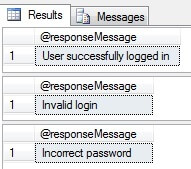
 

test encrypted password storage
Conclusion
Storing passwords in an encrypted way in the database and using unique salts for passwords, decreases the risks that passwords can be cracked. The SQL Server UNIQUEIDENTIFIER data type is a good candidate for a salt taking into consideration its uniqueness and randomness.

Saturday, January 30, 2016

Friday, October 9, 2015

Thursday, July 30, 2015

ADO.NET Destination in SSIS

ADO.NET Destination in Bulk Insert Mode and Foreign Keys

Bulk Insert option for SSIS ADO.NET Destination which is available since SQL Server 2008 R2 improves data load speeds significantly. This option is enabled on the ADO.NET Destination component by selecting the “Use Bulk Insert when possible”check-box (Screen capture 1)
Screen Capture 1 – ADO.NET Bulk Insert
Using the bulk insert mode does come with a catch, especially when the destination table has Foreign Keys. You would notice after the data load, the WITH CHECK constraint on Foreign Key becomes WITH NOCHECK. Probably this behaviour is because of the ADO.NET Destination component’s implementation of SqlBulkCopy which ignores check constraints by default.  The net effect  is that the  ETL would fail to catch data integrity issues which might result in cube processing failures at downstream.
Suggested Workarounds:
1. Many ETL frameworks disable foreign keys before data loading to take advantage of parallel data loading and enable foreign keys just before cube processing. Such ETL frameworks would be immune to the above behaviour as the data integrity exceptions are caught before the cube gets processed.
2. Another alternative would be to use OLEDB Destination with fast load option which has comparable data load speeds as ADO.NET Destination in Bulk Insert mode.

Tuesday, July 28, 2015

Aggregate Transformation in SSIS

What is the Aggregate Transformation?

The Aggregate transformation is used to perform aggregate operations/functions on groups in a dataset. 

  • The aggregate functions available are- Count, Count Distinct, Sum, Average, Minimum and Maximum. 
  • The Aggregate transformation has one input and one or more outputs.
  •  It does not support an error output. 

When would you use the Aggregate Transformation?

As a rough rule, you should use the Aggregate transformation only when the data source cannot efficiently support the Aggregation processes by itself. If you are reading in data from a relational source, usually it will make more sense to have the server aggregate the data in a query before passing it into SSIS. An exception to this may be if you are hitting a live system and cannot afford to (or are not allowed to) load the server with queries. If you were reading from a Flat File source then you would have to use the Aggregate Transformation as the File System doesn’t provide any means to perform data operations.
The Aggregate transformation supports the following operations.
Group By: Divides datasets into groups. Columns of any data type can be used for grouping.
Sum: Sums the values in a column. Only columns with numeric data types can be summed.
Average: Returns the average of the column values in a column. Only columns with numeric data types can be averaged.
Count: Returns the number of items in a group.
Count distinct: Returns the number of unique non null values in a group.
Minimum: Returns the minimum value in a group. This operation can be used only with numeric, date, and time data types.
Maximum: Returns the maximum value in a group. This operation can be used only with numeric, date, and time data types.
The Aggregate transformation handles null values in the same way as the SQL Server relational database engine.
  • In a GROUP BY clause, nulls are treated like other column values. If the grouping column contains more than one null value, the null values are put into a single group.
  • In the COUNT (column name) and COUNT (DISTINCT column name) functions, nulls are ignored and the result excludes rows that contain null values in the named column.
  • In the COUNT (*) function, all rows are counted, including rows with null values.
Now let me demonstrate how you can create an SSIS package with Aggregate   transformation

Go to START ==> Microsoft SQL Server 2008 ==>SQL Server Business Intelligence Development Studio to launch BIDS.

Then go to File menu==> New Project ==>Select “Business Intelligence Projects” in the left tree pane -> Select “Integration Services Projects” and name the project as you wish and click OK.

Here in this example 

we want to get the sum of the sales amount  for each Color and English product name  based on the Dimproduct and FactInternetsales tables  data from AdventureworkDW Database. 


We want to perform database equivalent of SUM(SALESAMOUNT) GROUP BY Color and EnglishproductName  operation.


Here, we have Dimproduct and FactInternetsales  tables are OLEDB Source.

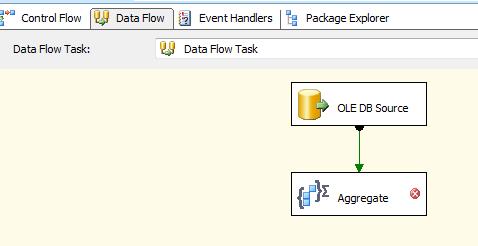
Now Drag and Drop Aggregate Transformation As Show below.
Double-click the Aggregate transform to open the editor. Next in the lower pane we select   the Input Column, se


What is the Aggregate Transformation?

The Aggregate Transformation provides a means of carrying out some simple aggregations on data pushed through SSIS, similar to those found in SQL where using “Group By” clause. The available aggregations are:
  • Group by
  • Sum
  • Average
  • Count
  • Count distinct
  • Minimum
  • Maximum
Below is a snapshot of the output from the example package Data Flow 1, where the SalesOrderHeader table in AdventureWorks is grouped by OrderDate, the Count aggregation is applied (by selecting the “(*)” column in the column selector) and the TaxAmt field is both Summed and Averaged. Note the row counts going in and coming out of the transformation – because of the grouping much fewer rows come out of the transform than are pushed in.


b
Fig 1: The Aggregate Transformation and its output

How to cut the same dataset different ways

The Aggregate Transformation can support multiple outputs – this means you can read the data set into memory once, then cut it up as many ways as you like. By clicking the Advanced button on the Aggregate tab of the component editor, a new grid is revealed. If you enter a new value in the “Aggregation Name” column, the column selector is enabled and you can create a new set of aggregations which will be delivered as a new output for the component, as demonstrated in Data Flow 2 of the example package.


Fig 2: The Aggregate Transformation with multiple outputs

Improving Performance in the Aggregate Transformation

The Aggregate Transformation is pretty quick as it runs in memory, but if you are shifting very large volumes of data through it and it is slowing down there are a few tweaks available. First is the Keysand KeyScale properties. These tell the component how many “Group By” distinct groups it should be prepared to handle. By default the value for KeyScale is “Unspecified”, but can be set to low (up to 500,000 keys), medium (up to 5m keys) or high (25m keys). If you are more certain of how many Keys you will be writing you can use the Keys property, which overrides KeyScale, and you can enter the amount of expected Keys. This can either be set per Aggregation output in the advanced editor grid, or globally using the Advanced tab of the editor. If you are using a CountDistinctaggregation you can set the CountDistinctScale and CountDistinctKeys properties which operate in the same way. Usually there is no need to adjust these properties.

The Audit Transformation in SSIS

SSIS Audit Transformation
Fig 1: The Audit Transformation

What is the Audit Transformation?

The Audit Transformation is a simple component that simply adds the values of certain System Variables as new columns (that you name) to the data flow. It allows for a single System Variable to be added as many times as you like. An example is below:
Same can be Achived using Derived Column Transformation, 
redundant though as adding a new column with the value of a System Variable can just as easily be done within a Derived Column Transformation,
Text 2
Fig 2: Column selection
These are the variables that are available:
  • ExecutionInstanceGUID – The GUID that identifies the execution instance of the package.
  • PackageID – The unique identifier of the package.
  • PackageName – The package name.
  • VersionID – The version of the package.
  • ExecutionStartTime – The time the package started to run.
  • MachineName – The computer name.
  • UserName – The login name of the person who started the package.
  • TaskName – The name of the Data Flow task with which the Audit transformation is associated.
  • TaskId – The unique identifier of the Data Flow task.
The sample package demonstrates some of these columns in the Data Flow “1 > Audit Transformation”

When would you use the Audit Transformation?

The most likely scenario for using this component is in creating log entries or adding metadata to error traps. It does seem  a little redundant though as adding a new column with the value of a System Variable can just as easily be done within a Derived Column Transformation, which offers greater flexibility. So the short answer is, I probably wouldn’t use this transformation. In the sample package I have a demo of using the Derived Column Transformation to achieve the same goals as the Audit Transformation, in the Data Flow “2 > Derived Co

Difference between OLE DB and ODBC?

ODBC (Open Data Base Connectivity) 

  • It is a connection method with data source.
  • It requires to set up a data source, or what is call DSN (Database Source Name) using a SQL Driver or other drivers if connecting to other database types.
  • Most database systems support ODBC.
  • ODBC provides access only to relational databases.

OLE DB (Object Linking and Embedding Database) 

  • It is a successor of ODBC.
  • Access to data regardless of its format or location i.e. access the data in uniform manner.
  • OLE DB does not require a DSN.
  • OLE DB provides full access to ODBC data sources and ODBC drivers.
  • In many cases the OLE DB components offer much better performance than the older ODBC.
  • OLE DB provides access to relational and non-relational databases.

Popular Posts

Recent Posts

Unordered List

Text Widget